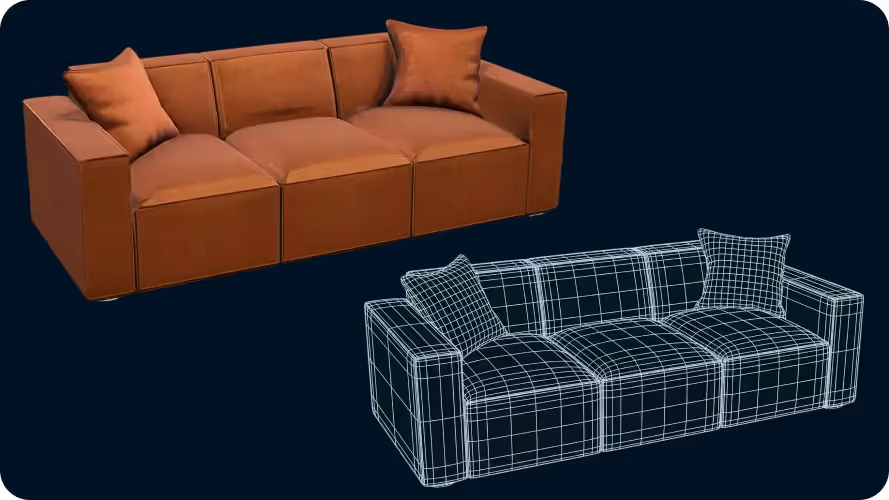
Product accuracy with multiview
Generate more accurate models using multiple views of your product, so 3D assets reflect product shape, proportions, and materials more faithfully.
Turn product photos into 3D models in minutes with image-to-3D AI — no traditional 3D workflow. Use 3D product previews on product pages, configurators, AR, and marketing.
Create interactive product pages that feel premium and modern.
Turn product images into 3D faster, then upload to Amazon or add 3D models to Shopify product media — reuse assets across channels.
Build richer landing pages with 3D that clients can actually publish.
Start from an idea, an image, or a controlled template when precision matters—fast multi-view 3D generation without a scanner.

Add interactive 3D to product pages with a copy-paste embed. Shoppers can rotate, zoom, and inspect products in the browser — without heavy files slowing your store.

Built for e-commerce teams, product managers, and marketers. Launch products fast and frequently by focusing on selling the product, not managing 3D production.

Sloyd creates 3D models for the products you sell instead of generic library assets. Every 3D model matches your catalog, brand, and storefront from day one.
Go to our Multi-Image to 3D tool and drag and drop your files. JPG, PNG, and WEBP supported, max 20MB.
Hit Generate and get detailed geometry and textures in moments — no 3D modeling skills or external software required.
Export your GLB file. Drop it into Shopify product media, Amazon listings, or your custom storefront.
Create characters, props, environments in any style, technical setting, and iterate until you have exactly what you want.
Generate more accurate models using multiple views of your product, so 3D assets reflect product shape, proportions, and materials more faithfully.
Set polygon counts and generate clean quad-based meshes that are easier to edit, optimize, and use in production.
Sloyd supports modern web-ready 3D formats. Export as GLB / glTF for interactive product pages and AR. Use OBJ for further editing.
No. Sloyd is built so product and marketing teams can generate 3D models without traditional 3D software. Start from images, templates, or prompts using simple controls.
Yes. Design variations by updating the image references used to generate the model or by retexturing after generation. Easy to produce consistent variants across product lines.
Sloyd uses multiple product views and structured model generation to create 3D assets that closely match your real products. Models reflect shape, proportions, and materials suitable for product pages and configurators.
Yes. Models are generated in structured, web-ready formats that work with common 3D viewers, AR experiences, and e-commerce storefront integrations.
Asset marketplaces provide fixed models that may not match your exact needs. Sloyd generates models specifically for your products, so visuals match your catalog and brand. You get control, consistency, and assets built around your storefront needs.
Sloyd focuses on structured model generation, not messy one-off AI geometry. Assets are built to be clean, controllable, and suitable for real production use including editing, optimization, and integration into existing pipelines.
Sloyd is designed for catalog-scale workflows. You can generate product families, variations, and related items in a consistent style and structure, making it practical to roll out 3D across many SKUs.
Add your model to Shopify product media as a 3D model — typically GLB (and USDZ where supported for AR). Start with a GLB optimized for web for faster loads.
Amazon now favors uploading 3D models to listings for experiences like View in 3D, View in Your Room, and Virtual Try-On — typically via Image Manager or the Seller app with GLB/glTF, reference photos, and accurate dimensions. Sloyd turns multiple product photos into web-ready GLB models that fit Amazon's workflow.
You can start from a single image; multiple product views improve accuracy for real catalog items. Generation typically takes minutes, depending on asset complexity.